If you have added TOCOO! Options such as an ETC card, in-car Wi-Fi device, or snow socks that require physical pickup when making your TOCOO! rental car reservation, please read this article to learn how to receive and return your TOCOO! Options.
TOCOO! is an online rental car booking platform and is not a rental car company that directly provides rental vehicles. Therefore, when you reserve TOCOO! Options that require physical pickup, the relevant items will be shipped to you by TOCOO!.
Depending on the TOCOO! Options you reserve and the pickup method, you may need to collect them at a designated convenience store, post office, or directly at the rental car store when picking up your rental car.
Below is a detailed guide to receiving and returning TOCOO! Options.
Table of Contents
1. How can I check where to pick up my TOCOO! Options?
2. How can I pick up my TOCOO! Options at a designated convenience store or post office?
3. How can I pick up my TOCOO! Options at the rental car store?
4. What should I do after receiving the package?
5. How do I return the items after use?
1. How can I check where to pick up my TOCOO! Options?
TOCOO! Options that require physical pickup, such as ETC cards (or Expressway Passes), Car Wi-Fi device, and snow socks, are generally picked up at a designated convenience store or post office.
Currently, some rental car stores also offer store pickup, allowing you to pick up your TOCOO! Options directly at the rental car store when you pick up your rental car, without having to visit a convenience store or post office separately.
You can check where to pick up your TOCOO! Options in the “【ToCoo!】 Reservation Confirmation” email.
- If you are picking up your TOCOO! Options at a designated convenience store or post office:
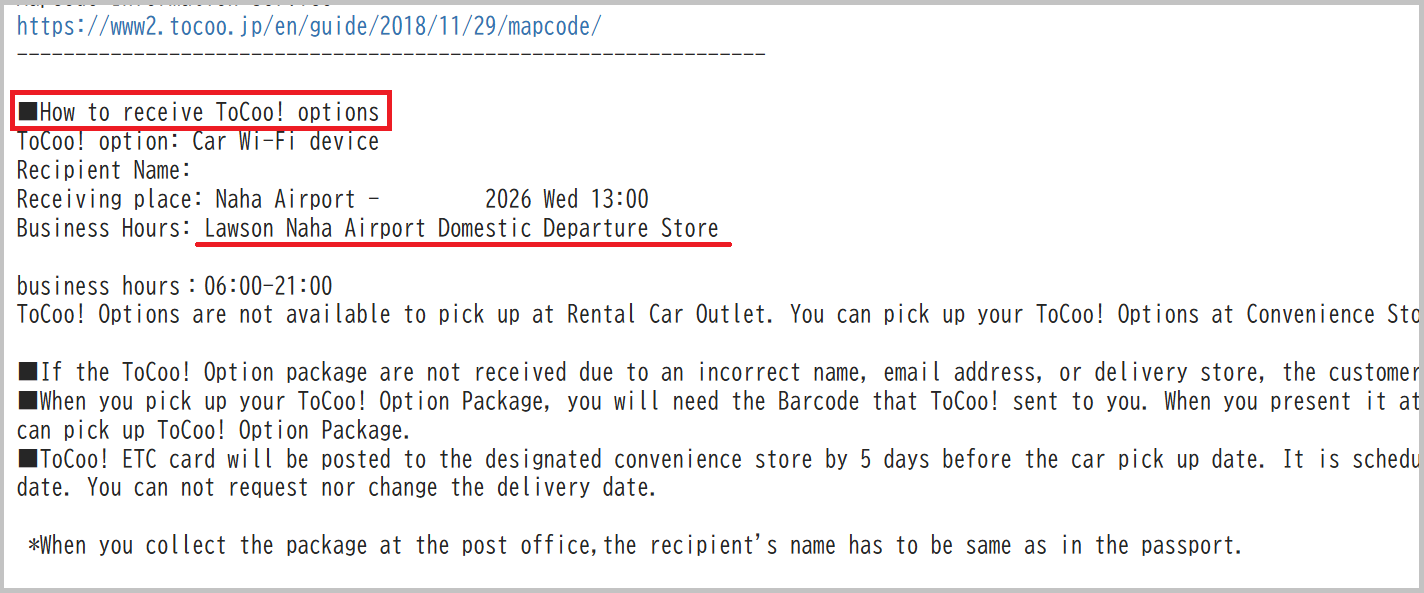
You can check the pickup location under “■How to receive ToCoo! options” in the “【ToCoo!】 Reservation Confirmation” email.
Example:
- If you are picking up your TOCOO! Options at the rental car store:
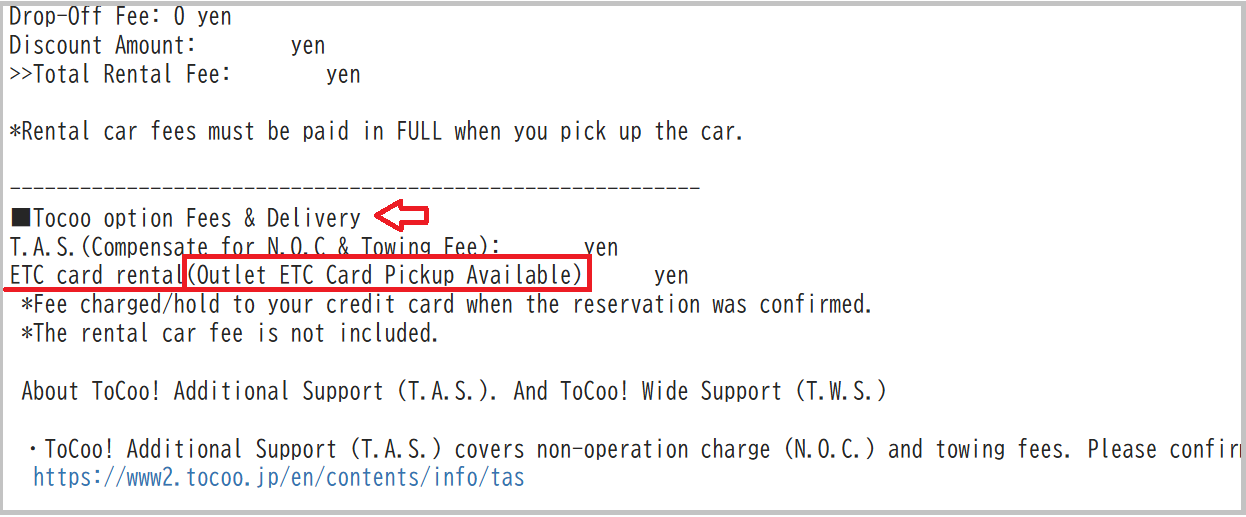
Please check the name of the TOCOO! Option.
If “Outlet Pickup Available” is displayed in the option name, you can pick up your TOCOO! Options directly at the rental car store when you pick up your rental car.
For example:
ETC card rental(Outlet ETC Card Pickup Available): 990 yen
Example:
2. How can I pick up my TOCOO! Options at a designated convenience store or post office?
If you have reserved TOCOO! Options that require physical pickup, TOCOO! will send you an email approximately 1–2 days before your rental pickup date.
The email will contain the QR code or barcode required to pick up your package.
Please check your email approximately 1–2 days before your rental pickup date.
On the day you pick up your rental car, please go to the designated convenience store or post office and present the QR code or barcode included in the email to pick up your package.
For picking up at the convenience store
Email subject: “TOCOO! Your TOCOO! option departures QR Code link and How to return“
For pickup at the post office
Email subject: “TOCOO! Your TOCOO! option departures Tracking Number and How to return“
Please click here for more details on “How to pick up the Tocoo! option package at the convenience store?”
https://www2.tocoo.jp/en/guide/2024/08/30/how-to-pick-up-the-tocoo-option-th/
3. How can I pick up my TOCOO! Options at the rental car store?
If you have reserved TOCOO! Options that require physical pickup, TOCOO! will send you an email approximately 1–2 days before your rental pickup date.
The email will contain the package tracking number required to identify your package when picking it up.
Please check your email approximately 1–2 days before your rental pickup date.
On the day you pick up your rental car, after arriving at the rental car store, please provide the staff with your ①reservation name and ②reservation number, and ③let them know that you have a package for TOCOO!.
Please ④also show the package tracking number so that the rental car company staff can identify and confirm your package.
Email subject: “TOCOO! Your TOCOO! option departures Tracking Number and How to return”
4. What should I do after receiving the package?
After receiving your TOCOO! Options package, please open the package yourself and check its contents.
Depending on the TOCOO! Options you reserved, the package may contain:
- ETC card (or Expressway Pass), if applicable
- Car Wi-Fi device, if applicable
- Snow socks, if applicable
- Return envelope (not included if you have only reserved snow socks, as snow socks do not need to be returned)
- Instructions for use
If a return envelope is included in your package, please keep it in a safe place.
ETC cards (or Expressway Passes) and in-car Wi-Fi devices must be returned using the return envelope included in the package after use.
5. How do I return the items after use?
ETC cards (or Expressway Passes) and Car Wi-Fi device must be returned using the return envelope included in the package after use.
Snow socks do not need to be returned.
⚠️ Please note
Even if you picked up your TOCOO! ETC card at the rental car store, you cannot return the ETC card to the rental car store after use.
The TOCOO! ETC card is different from the ETC card provided by the rental car company.
Therefore, please use the return envelope included in the package and return the ETC card according to the following instructions.
Return procedure
① Remove your TOCOO! Options from the vehicle when returning the rental car
⚠️Please make sure not to leave any items inside the vehicle. Rental car companies cannot return forgotten items on your behalf, and a lost item fee may apply.
② Put the TOCOO! Options into the return envelope
No information needs to be written on the envelope, and no postage fee is required.
③ Put the return envelope into a mailbox
You can put the return envelope into any mailbox in Japan.
You can also return it at a post office counter.
In addition, mailboxes for return envelopes are available at the following convenience stores:
- LAWSON
- MINISTOP
- Seicomart
6. Summary
After reserving TOCOO! Options, please make sure to check the following:
① Check how to pick up your TOCOO! Options
In the “【ToCoo!】 Reservation Confirmation” email, check whether your TOCOO! Options need to be picked up at a designated convenience store/post office or can be picked up directly at the rental car store.
② Check your email 1–2 days before your rental pickup date
Check the email containing the pickup QR code or package tracking number, as well as the return instructions.
③ Check the contents after receiving the package
Please open the package yourself and check its contents.
If a return envelope is included, please keep it in a safe place.
④ Return the items according to the specified method after use
In particular, even if you pick up a TOCOO! ETC card at the rental car store, you cannot return it to the rental car store.
This is the complete guide to receiving and returning TOCOO! Options.
We hope you can receive your TOCOO! Options smoothly and enjoy your self-drive trip in Japan!
If you have any questions, please contact us using the inquiry form below.